Security intelligence that runs on a Raspberry Pi.at the edge.
r450k is a suite of apps that install on hardware you already own: AI cameras, building sensors and badge readers at the edge, one control plane that adopts them all and correlates events across them, and single sign-on tying it together. It scales from a single Raspberry Pi watching a couple of cameras to a GPU server running real-time AI across dozens. Your footage — and everything else — never leaves your network.
Entry tier runs on a Raspberry Pi 4 (a couple of cameras with motion or nano-model AI). Real-time, multi-camera detection and teaching the camera your own skills scale up to mini-PCs and NVIDIA GPUs. The sensor hub, door controller, identity broker and control plane are single pure-Go binaries and need far less.
Capabilities
Everything a private, on-prem estate needs.
Cameras, sensors, doors, identity and fleet management — built to run on small devices, entirely on your own network.
Camera-first AI detection
Two-axis rules pair a mode — presence, crowd, intrusion, line crossing, multi-line crossing, or LPR — with target classes from a data-driven registry, scoped to multiple detection zones per rule. Rules about a stretch of time rather than a single frame come as standard: loitering, left behind (and, by default, only when nobody is standing beside it), and direction of travel, all reading the same detections and tracking, so a camera already running detection pays nothing extra for them. Fire and smoke ship as first-class event classes, and an "Anything" wildcard fires on any detected object.
License-plate recognition
A second-stage plate detector + OCR on a dedicated high-res frame fires on any readable plate or only a watchlist. Fuzzy matching absorbs OCR errors; plate text, vehicle type, and color ride the alert metadata.
Face recognition
Enroll the people you know, and a detection becomes a named alert. On the edge node, faces are aligned, embedded, and matched against your private gallery — so “person detected” turns into “a known face at the front door.” Enrollment and matching run entirely on-prem: no cloud service, no faces ever leaving your network.
Hide what must not be seen
Draw the neighbour’s window, the pavement outside the gate, or the keypad somebody types a PIN into, and the recorder asks the camera to black that area out itself — so those pixels are never recorded at all. It then reads the masks back off the camera and says, per camera and in plain words, whether that is confirmed rather than assumed. An export can black those areas out of the copy you hand over, and can be asked to paint over the faces in it too. The product is careful about which is which: a drawn zone is a guarantee, automatic face redaction is a best effort, and it says so beside the checkbox, on the finished file, and in the bundle’s manifest.
NVR recording that checks itself
Rolling segment buffer with event-triggered MP4 clip extraction, plus a low-resource JPEG ring-buffer mode. Optional one-pass GPU H.265/H.264 re-encode shrinks footage with on-the-fly playback transcode for any browser. It also verifies that it actually recorded: a continuity monitor scores every closed hour against the footage really on disk and raises a gap alert when a camera stops writing, and a tamper monitor notices a lens covered, sprayed, knocked out of focus, or turned to face a wall.
Play it back by the clock
A timeline screen plays footage by wall-clock time instead of by file: scrub a bar shaded with the coverage you actually have, seek straight across segment boundaries, and hold up to eight cameras synchronised on one moment at 0.25×–8× speed, with detections plotted as clickable jump marks. Ask for a moment nothing covers and it tells you so, instead of quietly playing the next thing it found.
Live view you can talk back through
Direct H.264 RTP-to-WebRTC live view with MJPEG fallback and live sound on any camera codec (G.711 pass-through, AAC→Opus transcoding). Two-way audio talk-back, press-and-hold PTZ, saved positions and guard tours let operators respond, not just watch. An arrangement worth keeping becomes a named video wall — stored on the appliance rather than in one browser, so it can be handed to the next shift — that cycles through its pages on its own and pulls a camera onto the visible page when it raises an alert. The control plane runs walls that span several recorders.
Respond, not just record
Most cameras have a terminal block nobody uses. Wire a door contact, a beam, a PIR or a panic button into a camera input and it lands in the feed the moment it trips — named, filterable, filed as a sensor reading rather than an AI detection. Drive the relay output the other way to trigger a siren, a strobe, a gate or a light, by hand or when a rule fires, and a rule can swing a PTZ dome onto a saved position and hold it there while somebody looks. A rule can only ever pulse an output, never latch it, and the camera is asked to switch it back off wherever it will accept the job — so a restart cannot leave a siren sounding.
Sensors, telemetry & safe actuation
The same idea as the NVR, but for everything that is not a camera: door contacts, motion, temperature, smoke, leaks, power meters and Modbus/SunSpec inverters, over an embedded MQTT broker — plus an opt-in, read-only LAN scan that finds what is already on the network. A deadbanded store keeps history small, threshold and correlation rules raise alerts, and scenes, schedules and a visual flow canvas automate the response. Every command back to a device is forced through one bounded, rate-limited, fully audited chokepoint.
Access control at the door
Badge readers speak OSDP over RS-485 or IP, and every badge-in is decided on the appliance itself against people, groups, schedules and holidays — so a cut uplink never means a door that will not open. Site-wide lockdown, a duress PIN that opens the door while silently raising the alarm, and an append-only activity log come as standard, and the strike only ever fires through one audited chokepoint.
Correlate cameras, sensors and doors
The rule no single appliance can write on its own: motion on a camera AND a door opening AND no badge accepted, inside the same window, at the same site. The control plane arms on the first signal, waits out a grace period for the innocent explanation, and only then raises one correlated incident instead of three unrelated alerts.
Encryption, backup & recovery
Recordings, snapshots, and training images are AES-256-GCM encrypted on disk; factory reset crypto-erases by destroying the key and multi-pass shreds deleted footage. The key is wrapped by an OS keystore (DPAPI / systemd-creds) or a portable passphrase with an exportable recovery escrow — and a passphrase-encrypted .mmbackup moves cameras, rules, and settings between hosts.
Teach it new skills
No ML jargon, no dataset wrangling. A guided wizard teaches the camera a new skill — name it, pick a goal (recognize a new object, tell good from bad, or spot anything unusual), show a few examples, check the accuracy, and turn it on. It builds and trains a real custom model behind the scenes, then hot-swaps the live detector.
Unified notification feed
One feed across AI detection, camera and machine health, and login security — with per-event acknowledge, annotated screenshots, and in-page clip playback. Filter the feed down to a single source camera to isolate one view’s events, or put any row straight into a case file from the screen where you noticed it. Route to email, webhook, Telegram or MQTT — or to a phone: add the fleet page to a home screen and it installs like an app, and registering a device sends a real notification there and then and reports what actually happened, rather than claiming a switch is on.
Fleet pairing over the LAN
Authenticated UDP multicast discovery + single-parent adoption with a short-lived claim code. Nodes enroll for a fleet-CA certificate and serve a mutual-TLS management channel — no inbound ports, no cloud broker. Each node’s certificate auto-renews on an operator-gated schedule, so fleet trust stays current and no forgotten node lapses.
Fleet maps & floor plans
The control plane puts your whole estate on a map — sites and buildings pinned by location, with every edge node and its cameras layered on top. Drop into a building to design its floor plan in-app, place each camera on the plan with a field-of-view coverage cone, and see one building’s cameras aggregated across several nodes. Click any camera to locate it or open its live view straight from the map.
Run the fleet, not the appliances
Declare what a node’s settings ought to be — recording continuity, camera reachability, tamper detection, health thresholds, retention — and the control plane reports every quarter of an hour which appliances have drifted. It only reports, until you opt a policy into writing the value back. Upgrade in rings with a canary first, where a ring passes only when every node returned, reported the target version itself, and held it for a settle window. And answer what the fleet’s uptime WAS, not only what it is, per node, per site and per month — with the spans where the control plane itself was not watching counted rather than quietly skipped.
Survives losing an appliance
A recorder is the only thing recording its own cameras. Name a spare and it is kept supplied with that recorder’s camera list — then press Test on a quiet afternoon and the spare actually opens every one of those cameras and reports, per camera, whether it could and whether it has the headroom to keep them. Until you do, the plan says NEVER TESTED and nothing pretends otherwise. Flag the rules whose evidence must outlive the box and the fleet pulls those clips off the appliance and keeps its own hash-verified copy, for the case where the recording is destroyed by whoever set off the alarm. The control plane and the identity server themselves run as several instances behind a load balancer.
An analyst that reads the fleet for you
A daily — and optionally weekly — digest reads the whole estate and reports what changed: event-volume swings, a node breaking its own learned baseline, outages, expiring certificates, noisy sources, sensitive audit activity, even a suggested rule for after-hours activity nothing covers yet. Every number is computed in plain Go, so a digest finding is never a hallucination. An optional language model — your own endpoint, or a supervised sidecar you can carry in on a USB stick — adds an "ask the fleet" chat that cites the records it used and answers "how do I…" straight from the built-in manuals. It runs on your hardware or not at all.
Analytics dashboard
The unified event feed becomes insight — KPI tiles, detections over time, and per-category, per-camera breakdowns with a range selector and auto-refresh. It goes past charts: an activity heatmap by hour and weekday, an expected-range band that flags when a camera breaks its own normal pattern, spike and "unusual silence" anomaly alerts, a per-camera reliability scorecard, and a notification noise ratio. Aggregation runs server-side, so it works on SQLite or a full database engine.
Object Search
Search your footage by what the cameras actually saw. Every detection is coalesced onto a searchable timeline — filter by camera, date range, one or more object types at once, and confidence, then jump straight to the exact moment in the recording, with the object boxed on a preview thumbnail. Export the results to CSV or PDF. It taps the live detector's own output, so there is no second video pass. Pick a recorded person or vehicle and "Find similar" ranks every other sighting on the appliance by appearance — and the control plane asks the same question of every node at once, merging what each recorder saw and recognized into one list.
Case files and verifiable evidence
An investigation gets somewhere to live. A case collects the footage, the sightings and the operator’s notes for one incident — bookmarked straight off the timeline or the notification feed, annotated with why each piece matters, handed to a colleague, and closed with a stated outcome. The part that makes it worth opening: while a case is open, retention, a manual purge and the clean-up that runs when the disk fills all refuse to delete the footage it points at. It exports as one bundle — the clips joined without re-encoding, a manifest naming each source segment and its SHA-256, the chain of custody as a CSV, and a plain-text note explaining how to check all of it with standard tools.
Enterprise identity, MFA & audit
One sign-on across every app, from a single pure-Go binary that never leaves your intranet. Local accounts alongside LDAP / Active Directory, Kerberos SPNEGO desktop SSO and generic OIDC providers, with group-to-role mapping and per-app, per-page access control. TOTP and WebAuthn security keys, password policy, lockout and step-up re-authentication guard the front door; an immutable audit trail, live session administration and passphrase-encrypted backup/restore keep it accountable.
Deploys and runs itself
A first-run wizard walks setup end to end in every app, a capacity estimator sizes your host, and machine-health monitoring self-heals — overwriting the oldest footage before the disk fills. Each app also carries its own printable four-language user manual compiled into the binary, readable offline from the sign-in screen. ffmpeg, the Python AI runtime, and app updates all install from inside the app.
How it works
From bare devices to actionable alerts in four steps.
01
Discover
Authenticated ONVIF discovery and manual probe find cameras on your LAN, an enrollment window or read-only network scan finds sensors, and OSDP readers announce themselves on the bus. Saved devices persist in a local SQLite database.
02
Detect
On-device YOLO inference runs your detection rules — presence, crowd, intrusion, line crossing, or plate recognition — against the live frames, while sensor thresholds and badge decisions are evaluated on the appliance itself.
03
Record
Continuous NVR recording rolls in the background and extracts an MP4 clip the moment a rule fires, encrypted on disk; telemetry and every access decision land in their own append-only history. Play it back by the clock on the timeline, and pin what matters into a case file so retention cannot take it.
04
Notify
Alerts land in the unified feed with an annotated snapshot and clip, correlate across cameras, sensors and doors at the control plane, and fan out to the email, webhook, Telegram, MQTT or phone destinations you choose.
Hardware
Scales with your hardware.
The camera node is the hungry one: it runs from a pocket-sized appliance to a GPU server, and you choose the tier. The sensor hub, door controller, identity broker and control plane are single pure-Go binaries that fit comfortably alongside it. (Camera counts are rough; the built-in capacity estimator measures the real number for your host.)
Minimal
Raspberry Pi 4/5 · 4 cores · 2–4 GB
~1–4 cameras
Live view + recording for a couple of cameras; AI is native motion or YOLO-nano at a relaxed interval. SQLite, CPU software decode, no GPU.
Recommended
Optimal
Mini-PC / NUC · 6–8 cores · 8–16 GB
~6–16 cameras
Continuous recording with real-time YOLO detection at the 2 s default. An entry NVIDIA GPU lifts camera count and keeps AI real-time.
Maximum
Server · 12+ cores · 32 GB+ · NVIDIA GPU
20+ cameras
GPU-accelerated detection, in-app model training, HEVC NVENC compression, and long retention. Server DB engine + Redis at scale.
See it in action
A console built for operators, not just admins.
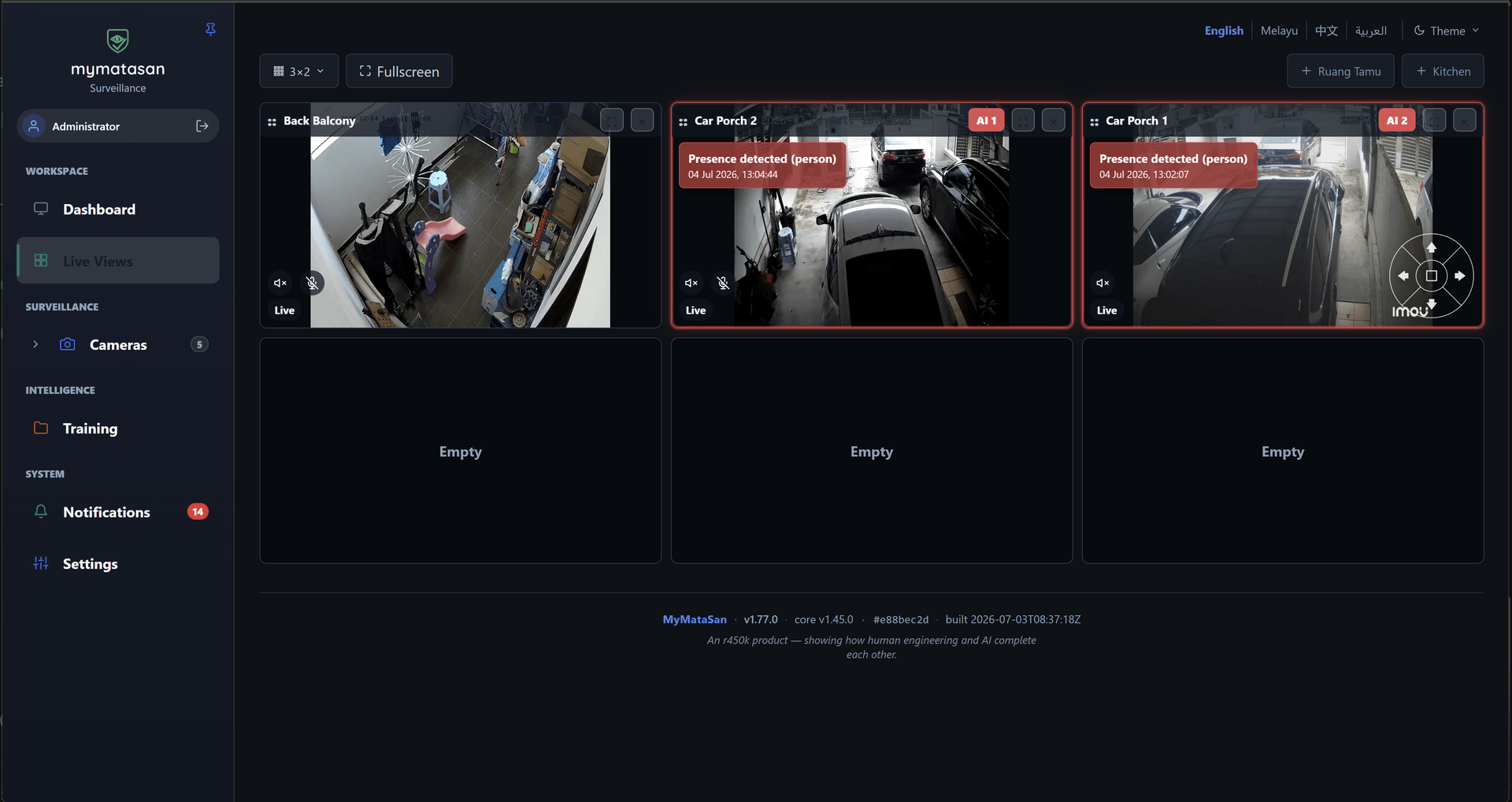
These screens are MyMataSan, the camera node: live multi-camera grids, detection rules drawn on the real frame, guided camera teaching with no ML jargon, continuous NVR recordings, event analytics, encrypted backups, and version & health. Every app in the suite shares the same shell — in the browser, in four languages.
mymatasan.local/live
Live multi-camera grid in a 3×2 layout, with on-frame “Presence detected (person)” AI badges on two of the feeds
Use cases
Built for places that can’t send their data to the cloud.
Manufacturing & QA
Train a custom model to flag product defects, missing parts, or PPE gaps on the line — private, on-prem, with no per-seat AI fees.
Retail & forecourts
Crowd and intrusion alerts, plus license-plate recognition for forecourt and drive-through monitoring.
Warehouse & logistics
Watch loading docks and yards — vehicle and person detection with line-crossing at gates, all on edge hardware.
Property & perimeter
After-hours intrusion detection with secure, encrypted recording that stays on-site.
Access-controlled facilities
Badge readers, access schedules and site lockdown decided on-site, with the camera that watched the door and the sensor that felt it open reporting into the same timeline.
Agriculture & remote sites
Spot animals or intruders across land with poor or no connectivity; detection and recording run entirely locally.
Care homes & clinics
After-hours movement and fall-style alerts with footage that never leaves the building — privacy by default.
Industrial & utilities
Zone and line-crossing rules for restricted areas and equipment, on rugged hardware where uplinks are unreliable.
Multi-site fleets
A control plane adopts many edge nodes over the LAN — cameras, sensors and door controllers alike — maps every site and building, and relays live view back to operators, with per-building floor plans that place each camera and its coverage. It holds every site to one settings policy, upgrades the estate a ring at a time, reports what each site’s uptime actually was, and can fail a lost recorder over to a spare.
The platform
One platform, five apps.
r450k is a modular platform. mymatasan is the edge camera node, myiotsan the edge sensor hub, and mypintusan the door controller; the control plane adopts all three and correlates events across them, and shared identity ties it together.
mymatasan
Available
Flagship · in active development
The standalone edge camera & video-intelligence node: ONVIF, AI detection, NVR, WebRTC live view and saved video walls, timeline playback, case files with verifiable evidence export, encryption, and LAN pairing.
myiotsan
Available
Sensor hub · available now
The NVR, but for sensors: door contacts, motion, temperature, smoke, leaks, power meters and Modbus/SunSpec inverters over an embedded MQTT broker — with rules, alerts, scenes and schedules, a visual flow canvas, safe actuation, and telemetry history.
mypintusan
Platform
Access control · in development
The door controller: OSDP badge readers over RS-485 or IP, with people, groups, schedules, holidays, site lockdown and a duress PIN all decided on the appliance itself, so a cut uplink never means a door that will not open. Adoptable into the fleet like any other node — not yet available to download.
myseliasan
Available
Control plane · available now
The fleet control plane that discovers, adopts, and manages camera, sensor and door nodes alike — mapping every site, building, and node with per-building floor plans and camera coverage — and correlates events across them: motion on a camera AND a door opening AND no badge accepted. It holds the estate to a settings policy, upgrades it in rings, fails a recorder over to a spare that has been proved, runs a video wall spanning several recorders, writes the daily fleet digest, answers questions about the fleet, and renders printable PDF reports. It can run as several instances behind a load balancer.
myidsan
Available
Identity · available now
The single sign-on front door: one federated identity across every app, with local accounts, enterprise LDAP / Active Directory, Kerberos SPNEGO desktop SSO, and generic OIDC providers — plus TOTP and WebAuthn multi-factor, group-to-role mapping, per-app access control, live session revocation that reaches the relying app, and an immutable audit trail recording which application each account was actually let into. A single pure-Go binary that runs fully on your intranet, no egress — one instance or several behind a load balancer.
Pricing
Free for you. Fair for business.
Personal and non-commercial use is free — forever. Businesses keep the project alive with a simple commercial license. This is early pricing; we’ll tune it together as things grow.
Prices in USD. Non-commercial use stays free. Not sure which fits? Reach out and we’ll figure it out together.
Get the apps
Download & self-host.
Run one node at a single site, or a whole fleet from one control plane. Each is a single install with the web UI and a default config bundled. (mypintusan, the door controller, is still in development and not downloadable yet.)
Free for personal and non-commercial use — individuals, non-profits, education, and research. Commercial or in-business use, and any reselling, needs a commercial license.
Loading the latest release…
Keep your video — and your intelligence — on your own network.
r450k brings cloud-grade camera AI, sensor automation and access control to hardware you already own, with privacy as the default rather than an upgrade.